New KCRW Website Launched
KCRW is Southern California’s flagship National Public Radio affiliate, featuring an independent mix of music, news, and cultural programming supported by more than 55,000 member/subscribers. The non-commercial broadcast signal is simulcast on the web at KCRW.com, along with an all-music and an all-news stream and an extensive selection of podcasts. KCRW was a pioneer in online radio, they’ve been live streaming on the web since 1995. The station has an international listening audience, and is widely considered one of the most influential independent music radio stations around the globe.
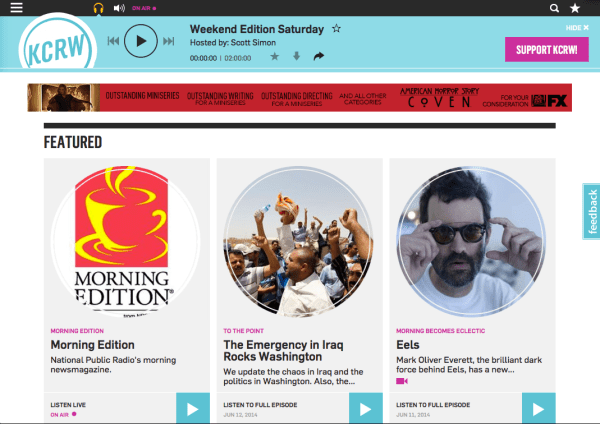
KCRW has used the Plone CMS for 7 years and for the last 6 the website has been running on Plone version 2.5, which has been increasingly showing its age. Over a year ago KCRW embarked on a project to redesign the site and upgrade the software and functionality, and they selected Jazkarta for the technical implementation. It was an amazingly fun and challenging project, with lots of interactive multimedia functionality and a beautiful responsive design by the New York City firm Hard Candy Shell. We’re very excited to announce that the site launched last Monday!
Making the Most of the CMS
Plone is a robust and feature rich enterprise CMS with many features and add-ons that were invaluable for developing the KCRW site. Some highlights:
- Flexible theming – Using Diazo, a theme contained in static HTML pages can be applied to a dynamic Plone site. For KCRW, Hard Candy Shell created a fully responsive design with phone, tablet and desktop displays. Jazkarta applied the theme to the site using Diazo rules, making adjustments to stylesheets or dynamically generated views where necessary so the CSS classes matched up.
- Modular layouts – We used core Plone portlets and collective.cover tiles to build a system of standard layouts available as page fragments. Many custom tiles and portlets are based on the same underlying views so editors can easily reuse content fragments throughout the site. Plone portlets are particularly handy because of the way they can be inherited down the content tree – for example allowing the same promotion or collection of blog posts to be shown on all the episodes and segments within a show.
- Managing editors – Plone provides granular control over editing permissions. For KCRW, this means that administrators can control what different types of users are allowed to edit in different parts of the site.
- Customizable forms – We created PloneFormGen customizations to track RSVPs, signups, and attendance at events.
- Salesforce integration – Plone has an excellent toolkit for integration with the Salesforce.com CRM. For this phase of the project we implemented basic integration. Stay tuned for additional KCRW member features to be added this fall that take advantage of the Plone-Salesforce connection.
Supporting a Radio Station
KCRW is a radio station, and we developed some cool features to support their content management process and all the rich media available on the site.
- A set of custom content types (shows, episodes, segments, etc.) and APIs for scheduling radio programs and supporting live and on demand audio and video. The APIs provide all sorts of useful information in a consistent way across lots of contexts, including mobile and tablet applications.
- An “always on top” player built using AJAX page loading – as you navigate around the site it just keeps playing and the controls continue to show. This works equally well on mobile devices and desktops.
- Central configuration of underwriting messages in portlets using responsive Google DFP tags.
- Integration with many external services like Disqus for threaded comments, Zencoder for audio encoding, Ooyala for video hosting and encoding, and Castfire for serving podcasts and live streams with advertising.
- An API for querying data about songs played on the station – live or on demand. The API is built on the Pyramid framework and queries a pre-existing data source.
A Robust Deployment Platform
More than any other client, KCRW’s site provided the impetus for us to adopt AWS OpsWorks. KCRW.com had been hosted on a complex AWS stack with multiple servers managed independently. We needed an infrastructure that was easier to manage and could even save KCRW money by being easily scaled up and down as needed. Another major concern was high availability and we tried to eliminate single points of failure.
To accomplish this we made sure everything on OpsWorks was redundant. We have multiple instances for nearly every piece of functionality (Plone, Blob Storage, Celery, Memcached, Nginx, Varnish and even HAProxy), and the redundant servers are in multiple Availability Zones so the website can withstand the failure of an entire Amazon AZ. The layers of functionality can be grouped onto a single instance or spread across multiple instances. It’s easy to bring up and terminate new instances as needed; this can be done manually, or automated based on instance load or during specific times of day. Time-based scaling is particularly relevant to KCRW and we are still experimenting with how best to schedule extra servers during popular weekday listening hours. Amazon’s Elastic Load Balancer and Multi-AZ RDS services give us the ability to deploy resources in multiple Availability Zones and eliminate single points of failure.
Dynamic Client, Dynamic Site
All of these technical details are fun for developers to talk about, but what’s really impressive is how much fun the site is to look at and use. Kudos to KCRW for having the vision to create such a great site, and to KCRW staff for the appealing new content that appears every day.
Here at Jazkarta we’ve been creating repeatable deployments for Plone and Django sites on Amazon’s AWS cloud platform for 6 years. Our deployment scripts were built on mr.awsome (a wrapper around boto, Python’s AWS library) and bash scripts. Our emphasis was on repeatable, not scalable (scaling had to be done manually), and our system was a bit cumbersome. There were aspects that were failure prone, and the initial deployment of any site included a fair amount of manual work. When we heard about AWS OpsWorks last summer we realized it would be a big improvement to our deployment process.
OpsWorks
OpsWorks is a way to create repeatable, scalable, potentially multi-server deployments of applications on AWS. It is built on top of Chef, an open source configuration management tool. OpsWorks simplifies the many server configuration tasks necessary when deploying to the cloud; it allows you to create repeatable best practice deployments that you can modify over time without having to touch individual servers. It also lets you wire together multiple servers so that you can deploy a single app in a scalable way.
OpsWorks is a bit similar to PaaS offerings like Heroku but it is better suited for sites that need more scalability and customization than Heroku can provide. The cost of Heroku’s point and click simplicity is a lack of flexibility – OpsWorks lets you change things and add features that you need. And unlike the PaaS offerings, there is no charge for OpsWorks – you don’t pay for anything besides the AWS resources you consume.
Briefly, here’s how it works.
- First you create a stack for your application, which is a wrapper around everything. It may include custom chef recipes and configuration and it defines the AMI that will be used for all the instances. There are currently 2 choices, latest stable Ubuntu LTS or Amazon Linux. (We use Ubuntu exclusively.)
- Within the stack you define layers that represent the services or functionality your app requires. For example, you might define layers for an app server, front end, task queue, caching, etc. The layers define the resources they need – Elastic IPs, EBS volumes, RAID10 arrays, or whatever.
- Then you define the applications associated with the layers. This is your code, which can come from a github repo, an S3 bucket, or wherever.
- Then you define instances, which configure the EC2 instances themselves (size, availability zone, etc.), and assign the layers to the instances however you want. When you define an instance it is just a definition, it does not exist until it is started. Standard (24-hour) instances are started and stopped manually, time-based instances have defined start and stop days and times, and load-based instances have customizable CPU, load or memory thresholds which trigger instances to be started and stopped. When an instance starts, all the configuration for all the layers is run, and when it is stopped all the AWS resources associated with it are destroyed – aside from persistent EBS storage or Elastic IPs which are bound to the definition of the instance in OpsWorks instead of being bound to an actual instance.
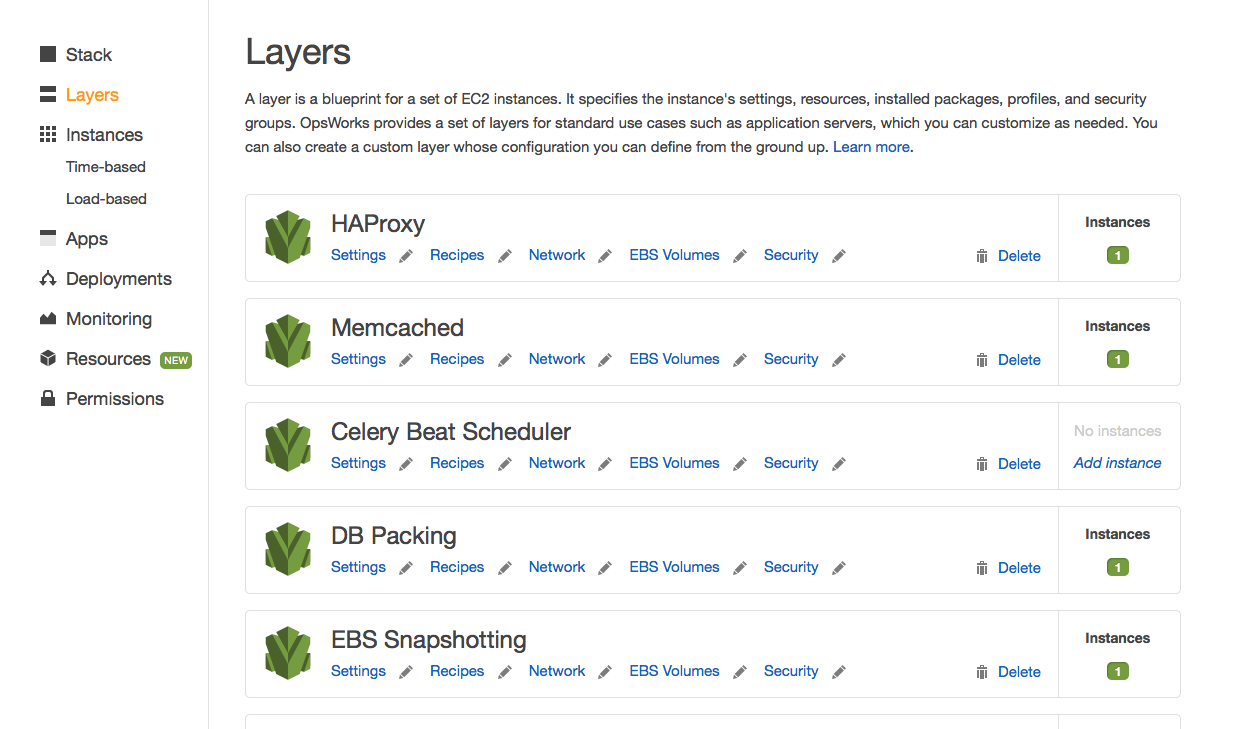
Managing Layers

Managing a time-based autoscaling instance
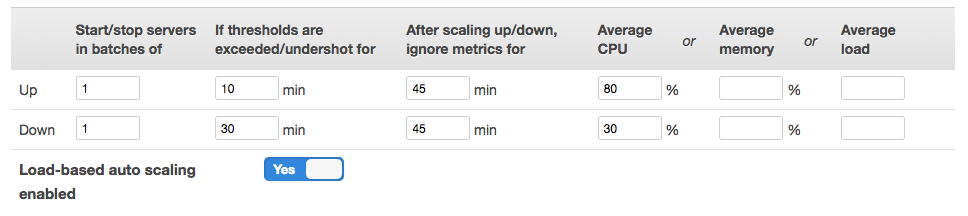
Managing a load-based autoscaling instance
For more details and a case study about switching from Heroku, see this excellent introduction to OpsWorks by the folks at Artsy.
What We Did
OpsWorks has native support for deploying Ruby on Rails, NodeJS, Java Tomcat, PHP, and static HTML websites, but no support for Python application servers (perhaps partly because there is no standard way to deploy Python apps). This was a situation we thought needed to be remedied. Furthermore, few if any PaaS providers are suitable for deploying the Plone CMS which many of our clients use. Because OpsWorks essentially allows you to build your own deployment platform using Chef recipes, it seemed like it might be a good fit.
Chef is a mature configuration management system in wide use, and there are many open source recipes available for deploying a variety of applications. None of those quite met our needs in terms of Python web application deployment, so we wrote two new cookbooks (a bundle Chef recipes and configuration). We tried to structure the recipes to mimic the built in OpsWorks application server layer cookbooks.
The repository is here: https://github.com/alecpm/opsworks-web-python. Each cookbook has its own documentation.
- Python Cookbook – provides recipes to create a Python environment in a virtualenv, to deploy a Django app, and to deploy a buildout
- Plone Cookbook – builds on the Python and buildout cookbooks to deploy scalable and highly available Plone sites
The Plone cookbook can handle complex Plone deployments. An example buildout is provided that supports the following layers:
- Clients and servers and their communication
- Load balancing
- Shared persistent storage for blobs
- Zeoserver
- Relstorage – either via Amazon RDS or a custom database server in its own OpsWorks layer (there is a built in layer for MySQL)
- Solr
- Redis and Celery
- Auto-scaling the number of Zeo clients from the AWS instance size
The recipes handle automatically interconnecting these services whether they live on a single instance or on multiple instances across different Availability Zones. For more information, see the README in each cookbook.
What’s Next
We’ve used OpsWorks with our custom recipes on a few projects so far and are quite happy with the results. We have a wishlist of a few additional features that we’d like to add:
- Automated rolling deployments – a zero down time rolling deployment of new code that updates each Zeo client in sequence with a pause so the site doesn’t shut down.
- Native Solr support – use the OS packages to install Solr (instead of buildout and collective.recipe.solr) and allow custom configuration for use with alm.solrindex or collective.solr in the recipe.
- Integration of 3rd party (New Relic, Papertrail, …) and internal (munin, ganglia, …) monitoring services.
- Better documentation – we need feedback about what needs improvement.
If you’d like to contribute new features or fixes to the cookbooks feel free to fork and issue a pull request!


 Jazkarta Blog