Jazkarta cooks up a new Plone site for Oxfam America
May I borrow that ? Or building on the work of others to get the job done.
Open source software has often been compared to cooking. There are recipes and cookbooks (though reading one in public will raise some eyebrows), the ingredients are lines of code. I recently traveled to Portland Oregon to attend the Open Source Bridge Conference. I visited a friend of mine who built a backyard bread oven. We decided to make pizza. Though we made the dough by hand, there were many things that were pre-assembled, prepared ahead of time or imported from somewhere else, like flour, cheese, olives. All we needed to bring was our dough making skills (which we used a recipe for), adding to it some pre-assembled, ready to go ingredients.
Building websites using open source tools like Plone reminds me of this process, some things we have to build, while other elements are ready to use, they just needed assembly towards an end goal.
We recently relaunched Oxfam America (www.oxfamamerica.org) on Plone 3.1. I will share with you our recipe for bringing this site into being. Along the way I will talk about the software ingredients that made this site possible.
Let’s start cooking!
Content Management
Plone provides the base for the entire project. Since the Plone UI uses familiar desktop editing metaphors, the out of the box usability is a big win for Oxfam America’s editorial staff. As their prior site was based on Plone 2.5, so far the favorite enhancement provided by the upgrade has been the inline editing capability.
Searching for content
Plone add-on used: collective.formcriteria
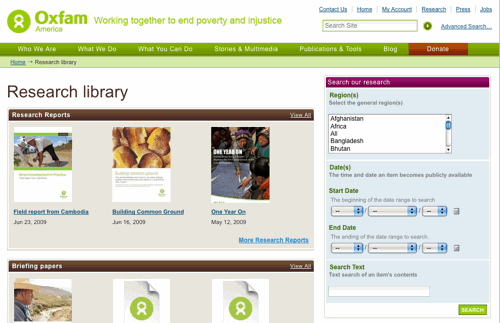
This is an add-on that allows you to build search interfaces and search portlets based on the Collections interface. Using this saved us significant development time and reduced the amount of custom coding and templating needed. When Oxfam America adjusted their search requirements, is was simply a matter of adjusting the configuration of the Collection. While using collective.formcriteria, we were able to sponsor improvements that made their way back into the collective.
Human friendly links
Plone add-on used: collective.redirect
This a redirect product that allows the user to create short URLS that map to either longer paths within the site or to an external URL; the latter feature differentiates is from the existing redirection tools. This allows Oxfam America to publicize a short URL that will redirect to an external fund raising or online advocacy site. This product was developed specifically for Oxfam America and released to the collective.
Slide shows
Plone add-on used: collective.slideshowfolder
This is an extension to SlideShow Folder that provides a series of useful extensions, including a portlet that can render the contents of a slideshow folder.
Multimedia
Plone add-on used: collective.flowplayer
All of Oxfam America’s video and audio content exists on outside servers either in the form of hosted files, or videos hosted on services such as YouTube. Collective.flowplayer was extended to provide player support for Link objects to allow Oxfam America to meet their specific goals. These improvements were also released back to the community.
See the multimedia area on the Oxfam America website. There are also listings of all videos and all audio slideshows.
Mapping the content
Plone add-on used: Maps
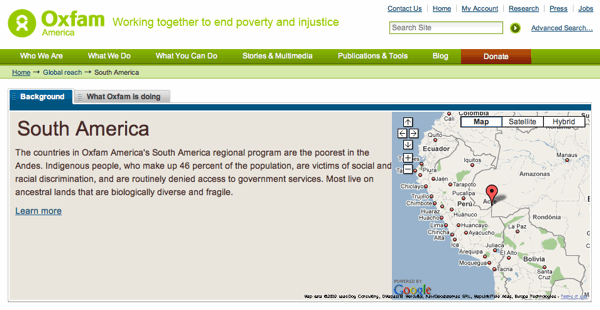
Jarn’s Maps product is the cornerstone product that enables Oxfam America to associate their editorial content with a geographical location. According to our developers, this product was well architected and a joy to extend. In the Oxfam America site, we used it to create individual Location objects that contain map coordinates. Any article or news story can be associated with a Location, which then drives the map widget contained in the template.
The Plone community often complains that there is no rating system for add-ons. I am giving Jarn’s Maps product five stars in my own personal rating system – this project would have been difficult to achieve without this tool, it is well engineered and works beautifully.
Easy to create tabs
Plone add-on used: collective.kuputabs
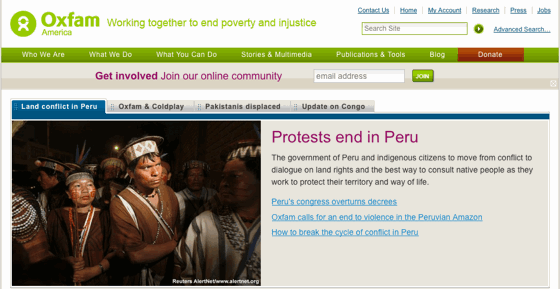
This is a great product. It gives content editors the ability to create tabbed interfaces by marking up content using a combination of Kupu and CSS classes. The tabs are rendered on the public view using a jQuery transform. We customized this product’s code to provide a tab solution for Oxfam America’s home page. Anyone needing to provide editing facilities for dynamic page elements should take a look at this product.
Tag cloud
Plone add-on used: Vaporization
This is an older product that provides a configurable tag cloud as well as faceted search abilities. There is an eggified version here: http://svn.plone.org/svn/collective/Vaporisation/tags/vaporisation-egg-2.0.1/
Engaging the media
Plone add-on used: Press Room
Press Room is a product that just fits the common use case for clients who need a press section. With the exception of a few extensions to the Press Officer type it was a drop-in solution for Oxfam America.
Image editing and management
Plone add-on used: Image Editor
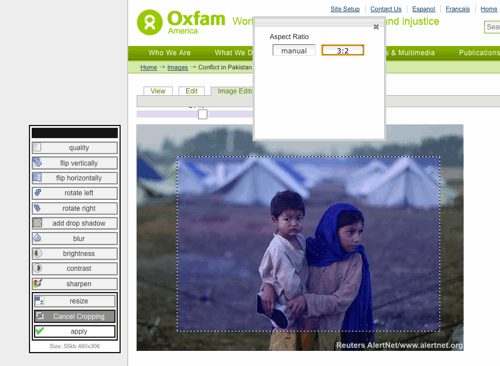
Oxfam America has thousands of visual assets. We used the Image Editor product to provide image cropping and resizing functionality. The default Image Editor aspect ratios were overridden, now editors can only choose from those ratios that fit within Oxfam America’s overall design standards. For example of this product in action, see the Oxfam America press room.
Interactive pages
On the UI layer we used a number of jQuery based tools to achieve the desired effects including:
jQuery UI Tabs and jQuery TOOLS Scrollable
Most of the tabs are driven either by a query on related items, or by Pages that are contained within a Folderish object. The latter provides an easy editing story for content authors to create, edit and order the appearance of the individual tabs.
We just launched this site and are still kicking the tires and finding some clean-up tasks. It was a long time in the making, and I would like to thank the highly capable web team of Oxfam America: Michael Borum, Kofi Bosque Hamilton, Robert Baker, and Jeff Deutsch. The web team was responsible for driving the overall visual and information design as well as implementing and troubleshooting the advanced CSS that made the site’s impressive overall look possible.
Banjo – progress report
Eric Steele and I have been making steady progress towards a working web-based tool for making theming Plone sites with Deliverance easier. The tool is called Banjo and is designed for non-technical persons who want to take a pre-existing HTML/CSS website design and make it work with Plone without touching the code.
Here’s the latest screencast:
In the previous screencast, we showed how you can click on elements in the content and theme panes, and identify the CSS selector representing that element. After brainstorming on the UI for how to do the actually mapping, we came up with a simple solution for now.
Step 1: Choose the source element
- Click on an element in the content pane – a dialog box appears
- Select which action you want to perform on that element
- Check off if you want to perform that action on the children of the element
- Click confirm
Step 2: Choose the destination element
- Click on an element in the theme pane – a dialog box appears
- Confirm which element you want to map
- Check off if you want to perform that action on the children of the element.
Future: Drag-n-drop UI
Eventually, we’d like to build a drag-n-drop interface so that you could just click and element in the content pane, hold the mouse down and drop it onto an element in the theme pane by releasing the mouse button. Then a dialog box like this would appear:
As always, feedback is very welcome. You can join the Banjo mailing list to join in on the conversation and download the buildout if you want to try it out.
By the way, in case you’re interested, these wireframes were created with OmniGraffle using the Yahoo! Design Stencil Kit, which I highly recommend. The SimpleWireFrame stencil is also really good.


 Jazkarta Blog