Plone quick-start: easily evaluate Plone using Amazon EC2
Plone 4 is undoubtedly one of the best open source content management systems out there, and it’s also very easy to download and install. However, there are times when you just need a quick evaluation or have to set up a test or demo site that people at different locations can use. In those cases, our Plone quick-start instances may be just what you need.
To quickly and painlessly get your own Plone site, you’ll need an Amazon Web Services account. Running your Plone site there is not free but it’s comparatively cheap and the set up cost is zero. We have prepared a couple of fully featured Plone Amazon Machine Images (AMIs), so all you need to do is fill out this form to add the Plone image that you want to use to your AWS account. You can be up and running in minutes.
What is included with the Plone quick-start AMI:
- Latest stable releases of Plone: 4.0 or 3.3.5
- Apache is configured to proxy to Varnish for caching
- Varnish is configured to proxy to Zope
- CacheFu is included (Products.CacheSetup for Plone 3.3.5, plone.app.caching for Plone 4.0)
- Supervisor is used to start/stop the Zope instance
- Backups of the Data.fs file are run daily (incremental) and weekly (full)
- ZODB packing prior to backups
- Logfile rotation of Zope logs
- Start/stop the instance and only pay Amazon while the instance is running. Stop the instance and not lose your data.
- Full SSH access to the server using your keypair for further configuration and customization
Note that at the moment we only have set up the Plone AMIs for the US East region. If you are interested in having them available for other regions, please leave a comment on this post. We’ll consider adding other regions if there’s enough interest.
Handling large files in Plone with ore.bigfile
Plone The Application is great. Out of the box it has a set of sensible defaults and features that are useful for a wide range of use cases. You can install Plone and without having to make any adjustments start using it immediately.
The stack that Plone is built on is very flexible, but if you push the defaults hard enough you will begin to discover the limits. This is the scaling issue: how does the application perform under high load. For Plone, as well as many other web applications, a sure way to increase the load on the system is to have it process large files. What is a large file? The answer is ‘it depends’. For purposes of this post we will assume it is any file large enough to make Plone feel slow for the end user, or worse result in a time out.
To be clear, handling large files is not a problem exclusive to Zope/Plone, it is an issue with many application servers. This description of the issue come straight from the Rails community:
“When a browser uploads a file, it encodes the contents in a format
called ‘multipart mime’ (it’s the same format that gets used when
you send an email attachment). In order for your application to do
something with that file, rails has to undo this encoding. To do
this requires reading the huge request body, and matching each line
against a few regular expressions. This can be incredibly slow and
use a huge amount of CPU and memory.
While this parsing is happening your rails process is busy, and can’t
handle other requests. Pity the poor user stuck behind a request which
contains a 100M upload!”
http://therailsway.com/tags/porter
Plone has the same issue of thread blocking. Let’s take the example of a 15MB file uploaded to Plone, with the file contents ultimately stored as a BLOB in the ZODB.
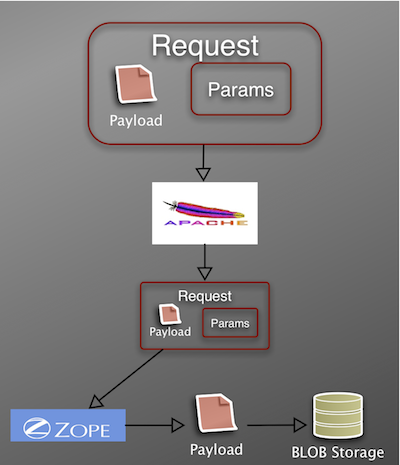
- Browser encodes file data in multipart mime format (payload) and sends this in the request body along with additional parameters such as the name of the file, etc.
- Apache receives the file and forwards the request to Zope.
- Zope must undo the coding, which is both CPU and memory intensive. During this processing the Zope thread is blocked, thus unable to service additional requests. The risk is that, in a multiple user scenario, you can potentially tie up all available threads.
- Once Zope has parsed the request, it can then write the file data – in this case it writes the data to ZODB BLOB storage.
For many sites, having Zope process the file in the above manner is an adequate solution. The size of the uploads is not usually large, and the site traffic is not heavy. Recently however, we had a client who needed a high availability site that could handle large file uploads and downloads. We had to find a way to increase Plone’s stock file handling performance. In order to do this we partnered with Kapil Thangavelu to develop both an implementation strategy and supporting code.
The general strategy can be summed up as:
- Offload file encoding/unencoding and read/write operations from Plone.
- Web servers are really good at handling the above tasks.
- Unlike application servers, for web servers like Apache file streaming is fast and threads are cheap.
Learning from Rails
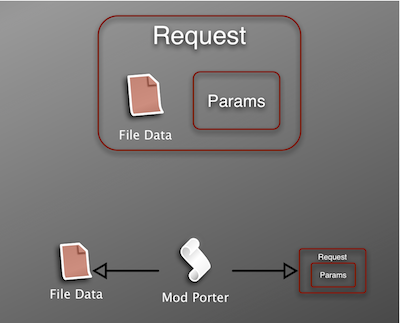
The first step is to move the file processing from Plone to Apache (or your web server of choice). A solution that comes from the Rails community is to use the ModPorter Apache module.
In a nutshell, ModPorter does the following to an incoming request.
- Parses the multipart mime data
- Writes the file to disk
- Modifies the request to contain a pointer to the temp file on disk
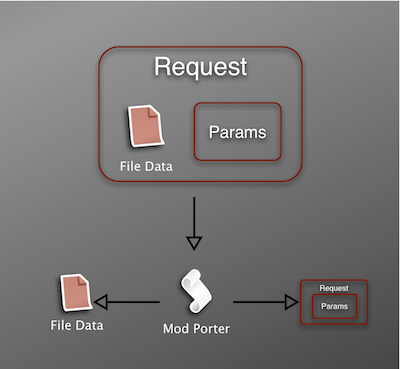
Clearly ModPorter is powerful magic, but we still have to integrate it with Plone. This is where Kapil’s ore.bigfile package comes into play.
ore.bigfile provides the following:
- A modified file upload widget that supports two upload methods
- Code to securely move the temp file created by the web server/ModPorter to BLOB Storage and link the data to a Plone File object (Blob.consumeFile).
- Code to provide an efficient method of downloading large files.
- An alternate (not CMFEditions) way of providing file versioning
With ore.bigfile in place, once ModPorter has finished writing the file data to disk, Blob.consumeFile is called with the necessary parameters to store the data in ZODB BLOB storage. The key is that Plone only has to process a lightweight request body to create the Plone File – the heavy lifting has already been done by Apache.
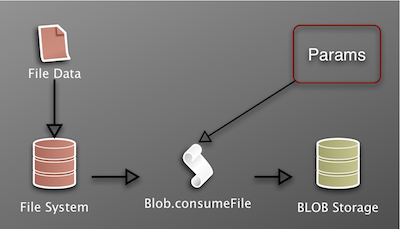
I mentioned that the file upload widget supports two upload methods. The first method supports uploading via the browser, as described above. The second method supports processing a file that was uploaded using an FTP client. Browsers in general are unreliable for long upload operations. However most FTP clients support continuation in the event that the transfer is interrupted. So for very large uploads (again it depends on the speed and quality of your network), the file is first uploaded via FTP to an incoming directory. When a new File object is created in Plone, the user has a choice to upload a new file using the browser, or select from list of files that have already been uploaded to the incoming directory. Data files are swept from the incoming directory after they are used in the creation of a Plone File.
What goes up, must come down
Solving the upload problem only gets you half way there.
Downloading large files will also tie up a Zope thread until the file is passed entirely to the front-end webserver. The solution is to use the second feature of ore.bigfile, which offloads the serving of the file from Zope to the front-end web server. The initial request is still handled by Plone to ensure the necessary security checks are in place, but instead of having Zope read the data from BLOB storage, ore.bigfile constructs a custom response to send to the webserver. When using Apache, the response consists of an X-Sendfile header and a path to the file data in BLOB storage. This results in Apache reading the file directly from disk, instead of having to read the data from Zope. This ensures that the Zope thread is quickly released so that it can respond to new requests.
Where to go from here
To recap, the default installation of Plone is incredibly useful. It works because it makes as few assumptions as possible about the installation’s environment. However for most production sites you need to begin integrating other tools – such as a caching proxy – to maintain system performance. In the case of caching, Plone uses a combination of internal software (Cache-Fu for example) and supporting software (Varnsih, Squid, etc.) As with caching, efficient large file handling could be implemented in Plone by extending the code and concepts from ore.bigfile to provide utilities that could be configured to work with common front-end webservers.


 Jazkarta Blog