Plone-Salesforce Integration Just Got More Powerful
We recently helped the Innocence Project finish collective.salesforce.fundraising, an open source fundraising package designed to help non-profit organizations raise money online. The system is designed to function either as a standalone donation system or to be integrated into a larger Plone website. The Innocence Project is currently using it as a standalone donation system.
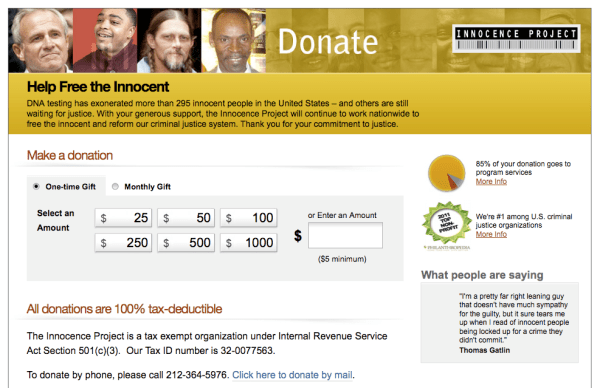
collective.salesforce.fundraising
The brainchild of the Innocence Project’s Jason Lantz, who developed the package with help from Groundwire and Jazkarta, this plugin adds significantly to the Salesforce.com functionality that can be tapped from the Plone content management system. The Plone CMS/Salesforce.com CRM integration capabilities previously consisted of:
- Submitting form information from a Plone form into Salesforce.com (web-to-lead forms)
- Adding a new lead to a Salesforce.com account when a new Paypal payment is made
- Making Events in your Plone site “RSVP-able” with data saved directly to Salesforce.com campaigns
- Authenticating in Plone with account information (login, password and properties) which is from Salesforce.com
- Dynamically displaying Salesforce.com data in Plone
That’s already a darn good package, but collective.salesforce.fundraising adds features that take things to a whole new level:
- The ability to take one time and recurring donations through an uncluttered, modern UI. All donations are sent directly to the payment processor (Authorize.net or Recurly), no credit card data is stored or transmitted.
- Integration with Salesforce.com campaigns. They can be created in Salesforce.com or Plone, and all changes and donations made in Plone are added to the Salesforce.com campaign.
- The ability to create campaign timelines and goals. Progress indicators in the UI show progress towards the goal and the time remaining.
- Personal fundraising, which allows users to create personal campaign pages for any campaign. Users can set a goal and promote their campaign to their friends; all donations roll up to the parent campaign in Salesforce.
- Social integration via Janrain, a social login and sharing service. This is important for personal fundraisers, since it allows login through a variety of social accounts, and sharing on multiple social networks to help spread the word about personal campaigns.
And there are many smaller features, like memorial donations, donor testimonials, fundraising “seals” providing third party analysis and endorsements, and an easy way for users to share campaigns with their social networks via “share messages” which can be tracked for effectiveness.
How Jazkarta Helped
The Innocence Project engaged Jazkarta to help with the donation and personal fundraising capabilities. This included selling tickets to events, adding campaign landing pages and personal fundraising pages, and working out some of the details of the social login process. Personal fundraising is a compelling addition to the package. The ability it provides for individuals to set themselves up as fundraisers under an umbrella project puts collective.safesforce.fundraising head and shoulders above many of the other solutions available to non-profits.
Convio Common Ground Customers Take Note
The addition of personal fundraising to collective.salesforce.fundraising comes at a particularly opportune moment. Only days after Jazkarta’s work was done, Blackbaud announced it was discontinuing Convio Common Ground, a fundraising and donor management application built on top of Salesforce.com and used by many small to mid-sized non-profits. A Plone+Salesforce.com powered fundraising site offers a great option for the 400 or so Common Ground clients that have to make a decision and migrate to a new system within the next 19 months. The Plone CMS and all of the plugins mentioned in this post are open source software with no licensing fees, and Salesforce.com is a great deal for small to mid-size non-profits. Through the Power of Us program, the Salesforce Foundation will donate 10 enterprise licenses worth $1600/month to 501(c)3 organizations, and any additional licenses are 80% off. There is also a 50% discount for in-person training and the customer portal is priced at $24/user/year.
Contact Jazkarta if you’d like more information about Plone-Salesforce powered online fundraising solutions.
Go Botany!
We’ve been having classic summer weather here in New England – gardens, fields and forests are exploding with lush vegetation. It brings out my inner botanist – something I actually have advanced training in. These days botany is usually a hobby for me, but two years ago my Jazkarta world and my botanist world came together on an amazing project – Go Botany.
In 2009 the New England Wild Flower Society was awarded a major grant from the National Science Foundation to develop an innovative suite of tools to teach botany and plant identification. This multi-year project has many deliverables, but the overarching goal is to develop radical new web-based tools for identifying plants that will improve botanical knowledge and science education for novices and citizen scientists. In other words, get more people hooked on plants!
Discovery
NEWFS selected Jazkarta to be their technology partner and we worked on the project throughout 2010. We started with a discovery phase, during which we sorted out the various tools, prioritized requirements, defined the technology platform, and created a plan for tackling development. Our plan relied on an agile, iterative approach; the project owner – Elizabeth Farnsworth, NEWFS Senior Research Ecologist and PI on the NSF grant – was always in charge of what we delivered next. This was essential since at the beginning of the project no one had a very clear idea of what the tools should look like. By working in an agile way we were able to easily adjust the plan as we learned more. This quote from the book The Art of Agile Development, by James Shore and Shane Warden (O’Reilly) summarizes the situation nicely.
The beginning of every software project is when you know the least about what will make the software valuable. You might know a lot about its value, but you will always know more after you talk with stakeholders, show them demos, and conduct actual releases. As you continue, you will discover that some of your initial opinions about value were incorrect. No plan is perfect, but if you change your plan to reflect what you’ve learned – if you adapt – you create more value.
Technology Platform
Python was a natural choice for implementation language because NEWFS IT staff were already using it. In addition to being mature, powerful, secure, open source, and object oriented, Python has a wide array of libraries available for scientific computing and GIS.
We considered several Python web frameworks that were popular at the time. Plone (the CMS in use at NEWFS) is not well suited to building the sort of custom applications we needed, but some of the other frameworks (like Grok and repoze.bfg) didn’t have enough functionality. We chose Django, which had gained traction in the Python community because of its simplicity, admin features, form technology, and the availability of numerous add-ons. Two of those add-ons were particularly critical to the success of the project: GeoDjango for adding GIS features, and Pinax for adding social networking features.
We had a lengthy in-house debate over the choice of database technology. PostGIS (the spatially enabled version of PostgreSQL, an industrial-strength open source relational database) was the clear winner for its compatibility with the Django ORM, and it was required for GeoDjango. But the data model for the botanical information was essentially a star schema (one table in the middle looking up information in dozens of auxiliary tables for attributes and vocabularies), which is much more efficient to implement in an object database than in a relational database. In the end, we chose to use PostgreSQL/PostGIS for everything, mostly because we knew it would make life easier for future developers and sysadmins on the project.
We needed one more component to implement the Go Botany tools, which were going to rely heavily on various types of search. We chose Solr, an open source search server based on the Lucene Java search library, to provide indexing and search services for all tools. It provides cross database search functionality over a REST interface, including features like custom query structures, common document type extraction, geographic searches, and search facets.
Implementation
By May we had put together a team and launched into release planning and implementation. The team consisted of Jazkarta developers and NEWFS developers working together on the project, with me as the PM and Elizabeth as the project owner. We like to have joint, collaborative teams with our clients whenever we can, it’s a great way to get their IT staff up to speed quickly. We also spent some time teaching Elizabeth about agile development practices, which helped her do a great job supplying us with the information we needed, when we needed it (user stories, feedback, etc.)
Database and API
Our first project was to design and implement the PostgreSQL database of botanical information that would drive all the Go Botany tools. NEWFS had previously built a Microsoft Access-based tool for entering the copious amounts of botanical data required for the project – dozens of characteristics for each of the thousands of species of New England plants. A time consuming part of building the database involved automating the import of all the MS Access data. We also implemented an API wrapper around the database that was optimized for the kinds of queries and transactions that would be required. The API calls were largely implemented as json web services for ease of integration into Javascript user interfaces.
The database plus API was the most technologically challenging part of the project. It had to provide a flexible and fast foundation for the entire family of Go Botany tools. It was also interesting to write “user stories” for this part of the project – the “users” were all the Go Botany tools, which would need to get information from the API.
Simple Key
Once the database and API foundation was laid, we began work on the Simple Key – an interactive, online guide to identifying 1,200 of the more common New England plants. This was the most challenging part of the project from a user interface point of view. It needed to be fun and exciting to seduce novices into learning about plants and botany, while at the same time being useful to pros. NEWFS engaged user experience designer Matt Belge (Visionlogic.com) to help them define the tool we would be building. Based on lots of interviews and other research, Matt produced wireframes for successive bits of Simple Key functionality, and we figured out how to implement them.
The result is unlike any previous plant identification tool. The Simple Key presents the user with a series of questions about their plant’s characteristics that are designed to home in on the species identification as efficiently as possible. It does this based on the questions that have already been answered and the features that the user is able to observe. The secret behind this behavior is an information gain algorithm that generates optimal decision trees.
When the user has identified their plant, they can go to a species page with a wealth of information – including maps of its geographic range, diagnostic characteristics, memorable facts, and gorgeous color photographs of the plant and its leaves, flowers, bark, etc. in different seasons. A fitting end to a successful quest.
And It’s Open Source
Because taxpayer dollars through the National Science Foundation supported this project, the software and data on plant characteristics will be open sourced. Details are still being worked out, but the goal is to enable others to contribute and improve the code over the long-term. Stay tuned to the Go Botany site for an announcement of the details. NEWFS staff are also engaged in adapting the database to allow other botanical institutions to customize the data for their particular region.
But This Is 2012!
Yes, all of our Go Botany work was done in 2010, so why am I blogging about this now?
We got Go Botany tool development off to a good start, but a lot of work remained after we were done. Seven botanical data specialists did a massive amount of manual data entry: scores of characteristics for thousands of plant species. Four image collectors scoured the web, publishers, and individual contacts for the gorgeous photographs used on the site. Botanists developed technical descriptions of the New England plant families and genera. Many NEWFS staff created videos, help pages, an illustrated glossary of terms, and other content. A web design firm, Fresh Tilled Soil, was hired to create the graphic design for the Go Botany website, including the Simple Key. NEWFS developers applied the theme to the Django site, as well as continuing to refine and fix the Python and Javascript code.
All of this hard work came to fruition in April: the Go Botany website is now live at http://gobotany.newenglandwild.org/!

So if you live in the northeast and you sometimes wonder what the name of a plant is, please try it out! Go Botany works best with Firefox, Safari, and Chrome on iPads, tablet and desktop computers (and the UI is being adapted for phones) so you can take it with you on walks and have an expert assistant for your botanizing. If you have comments, NEWFS would love to get your feedback at gobotany@newenglandwild.org.


 Jazkarta Blog