Plone+Salesforce: What’s Next?
 A big thank you to the Salesforce Foundation for inviting me to contribute a post on Plone+Salesforce integration to their blog. It was fun to reacquaint myself with all the tools and learn what’s new. Timely too, since we have just started work on a new Plone site for The Mountaineers which will include integration of all their custom content with Salesforce.com. We are working on this project in partnership with Percolator Consulting. They are engagement strategists and Salesforce specialists and are creating the CRM back end while we are creating the Plone site.
In the process of writing and discussing this post, I discovered that David Glick, who is working on The Mountaineers project with us, and Jason Lantz, from the Innocence Project, were having similar thoughts about the Plone+Salesforce toolkit. This week we had a chat to explore ways in which we might collaborate.
There are two main areas in need of improvement.
- Salesforce.com API integration – The current Python library used by Plone is Beatbox, which is a wrapper for the Salesforce.com SOAP API. We now have Simple Salesforce, a Python library providing a low level interface to the Salesforce.com REST API (it returns a dictionary of the API’s JSON response). There is also a new socket-based streaming API. David and Jason are evaluating replacing Beatbox with one of these more modern components.
- Message queuing – The current set of Plone+Salesforce tools rely on real-time communication with Salesforce.com, which slows performance and does not recover gracefully from network errors. A message queuing approach is sorely needed, where API requests can be queued for delivery and automatically retried. David and Jason are evaluating our options for Python message queuing. This includes but is not limited to plone.app.async. We would like the Plone implementation to build on a pure Python layer that could be used in any Python web framework (such as Django or Pyramid).
These items are critical to the success of The Mountaineers’ and the Innocence Project’s Plone+Salesforce integrations. In both cases the volume of API calls will be great enough that asynchronous communication is a must-have. Over the next few weeks we hope to create a plan that our two projects can collaborate on, for drastically improving the Plone+Salesforce infrastructure. This will benefit the entire Plone+Salesforce ecosystem – for example, the message queuing system could be used as the basis for a form-to-Salesforce solution that is more responsive and robust.
We would also like to improve the administrative tools that are available. Site admins will need a control panel that allows them to monitor and retry messages in the queue. Down the road it would be great to provide a way for integrators to define Plone to Salesforce content mappings through the web. Today it is necessary to do Python development to implement anything other than a fairly simple Plone+Salesforce web-to-lead form.
Our goal is to flesh out a plan by June 5th, when David, Jason and I will all be at Plone Symposium Midwest. Please contact me if you’d like to join our conversations, and maybe even sprint on an improved Plone+Salesforce infrastructure!
Responsive Design Made Easy with Plone
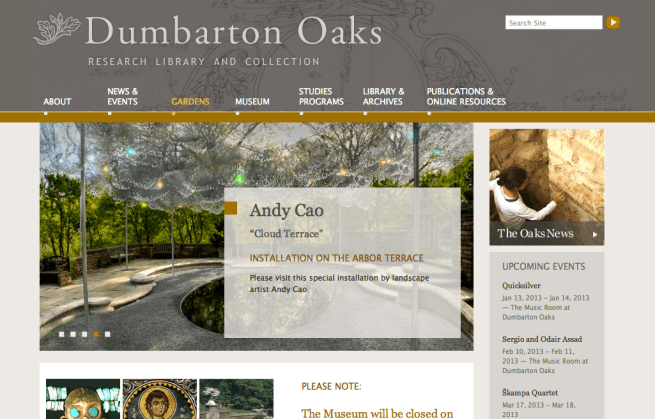
Last week Marianne Kay tweeted that the Dumbarton Oaks site was a “beautiful example of responsive design”. (Thanks Marianne!) Kudos for the beautiful Dumbarton Oaks graphic design go to the design firm Might & Main. But kudos for the responsive behavior go to Plone and the Plone community, which made implementation easy. Here’s how we did it.
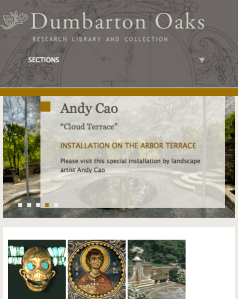
A responsive design provides an optimal viewing experience across a wide range of devices, from large desktop monitors to mobile phones. It uses CSS3 media queries, fluid, proportion-based grids, and flexible images to adapt the layout to the browser width. Normally, adding responsiveness to a website’s design means multiplying theming time by a factor of 2 or 3. But for the Dumbarton Oaks site responsiveness didn’t add much time because we used Plone’s built-in Diazo theming tool and started with a theme that provided responsive behavior out of the box. We didn’t have to write the code that (for example) makes images re-size, portlets change position, and menu tabs transform into drop downs for smaller screens. The Plone UI/CSS integration was already done for us.
Diazo is a fantastic tool that lets you map dynamic web page content from any CMS or web application into an HTML design. The mapping is done via a set of rules that define how to move elements from the content page into placeholders in the theme. Plone provides nicely integrated Diazo theming, soon to get even better with a through-the-web theme editor that will come with Plone 4.3. You can see a preview of it in this screencast made by Eric Steele.
Here is our recommended Diazo theming process.
- Choose a Diazo Plone theme that provides the desired responsive behavior. For the Dumbarton Oaks project we used beyondskins.responsive by Simples Consultoria.
- Create a static theme package to contain the designer’s HTML templates (including header and footer code), CSS, Javascript, and graphic assets. Diazo themes are pure HTML/CSS, so there is no need for designers to learn a special templating language.
- Have the designer base his or her HTML templates on the ones provided in the responsive theme.
- Add CSS files to the static theme that provide the responsive UI (from the responsive theme package), the Plone editing interface, IE fixes, and any special features provided by add-ons that are used on the site. Extract the contents of these files from the CSS that Plone serves with all products installed. Plone’s large CSS payload can be significantly pruned, only provide what’s needed.
- To style the HTML, have the designer supplement this CSS in a way that doesn’t interfere with necessary UI elements or harm the responsiveness. It is helpful to add this graphic-design-specific CSS in a separate file.
- Apply the static theme to the Plone site with Diazo rules.
- Plone’s markup consistency and quality is a huge benefit during this process. Just give the designer sample HTML and let them do what’s needed in the theme’s CSS.
When we engaged Might & Main to do the Dumbarton Oaks design, we forgot to tell them it was going to be responsive. They were very perturbed when they found out, since they had not budgeted to do the extra work that is normally required. We told them not to worry because that extra work had already been done in beyondskins.responsive. And sure enough, Dumbarton Oaks got a responsive design with very little effort from Might & Main.
Here is what the site looks like without the Diazo theme applied.
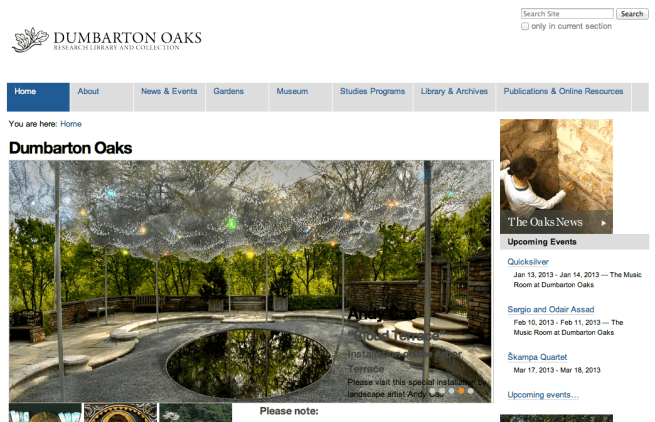
Here is what the themed site looks like on the desktop.
And here is what it looks like on a mobile device.


 Jazkarta Blog